Getting started · Option 2
Add an M3U playlist to Nitora IPTV.
Use a playlist link from your provider. Its entries become Live TV channels, grouped by category.
What an M3U playlist is
An M3U (or M3U8) playlist is a text file that lists stream addresses, usually with channel names, logos and categories. Providers share it as a web address (URL). Nitora IPTV downloads the list from that address on your TV.
- By link only. Nitora IPTV can’t import a playlist file from USB, a phone or a computer.
- Live TV only. Every entry is treated as a live channel. Playlists don’t carry the information Nitora IPTV needs for Movies or Series.
- Your own playlist. Use only playlists from services you’re entitled to use. Nitora IPTV doesn’t provide or recommend any.
Links with a username and password
Many providers give a playlist link that looks like this:
http://tv.example.com:8080/get.php?username=YOUR_NAME&password=YOUR_PASSWORD&type=m3u_plus
That link comes from an Xtream Codes service, so you can usually sign in as one instead, which also gives you Movies and Series:
- Use the part before
/get.phpas the Server URL, herehttp://tv.example.com:8080. - Use the value after
username=as the Username, and the value afterpassword=as the Password. - Follow the Xtream Codes guide.
The example address is made up. Your link contains your real login, so treat it like a password.
Add a playlist
-
Open Add Service
From Home choose Add Service, or open Settings › Services › + Add service.
-
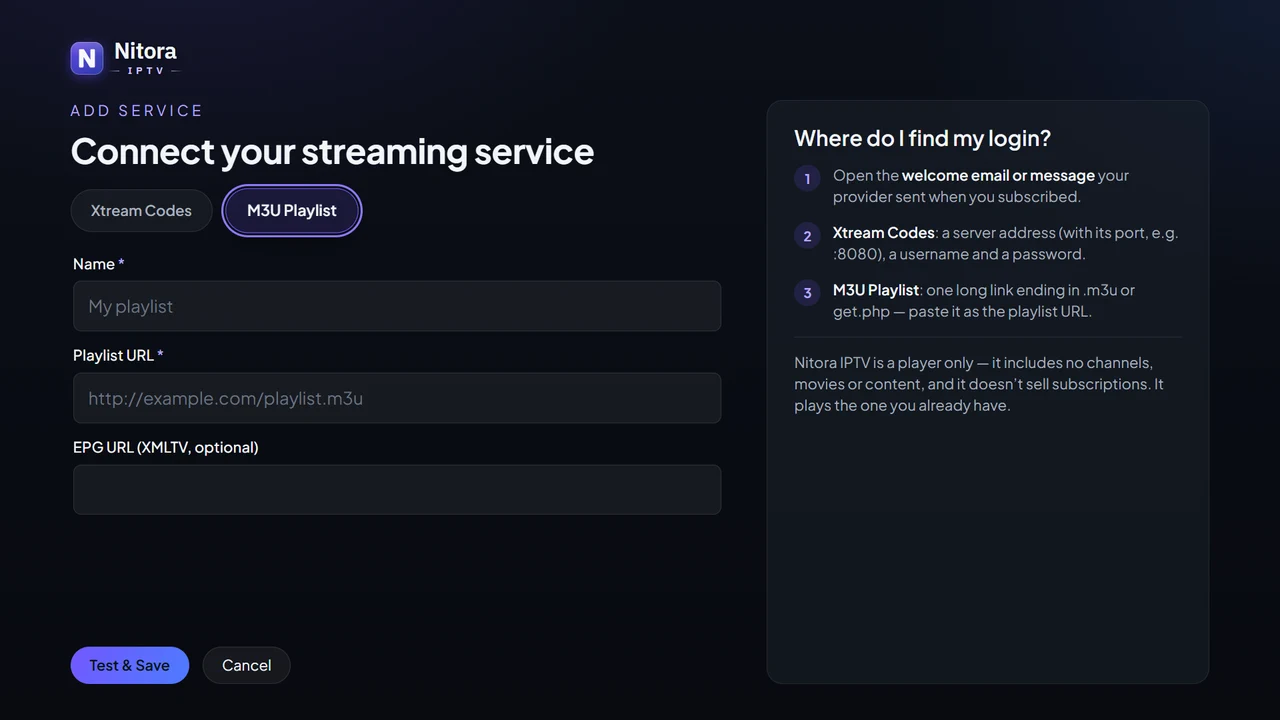
Select “M3U Playlist”
It’s the second option at the top of the form.
-
Name the playlist
Any label you’ll recognize. It’s only shown inside Nitora IPTV.
-
Enter the playlist URL
Type the full web address your provider gave you. If you leave out
http://, Nitora IPTV adds it. -
Leave “EPG URL” empty
The field is optional, and Nitora IPTV doesn’t read program guides for playlists yet.
-
Choose Test & Save
Nitora IPTV downloads the playlist and tells you how many channels it found, for example Playlist loaded — number channels.
-
Open Live TV
Channels are grouped by the categories in the playlist. Entries without one go into Uncategorised.
What to expect
- Channel names, numbers, logos and categories come from the playlist itself. If they look wrong, the playlist is the place to fix them.
- There’s no program guide for playlist channels yet, and no catch-up.
- A stream plays only if your TV can decode its format, and only while the source is online.
- Nitora IPTV keeps the downloaded list for about 30 minutes, then fetches it again, so changes from your provider appear on their own.
- You can add a playlist and an Xtream Codes login side by side, and switch between them in Settings.
If the playlist doesn’t load
| Message | What it means | What to do |
|---|---|---|
Playlist loaded — <number> channels | Nitora IPTV downloaded and read the playlist. | Nothing. Its channels appear in Live TV. |
That URL did not return an M3U playlist. | Something downloaded, but it isn’t a playlist (often a web page). | Check you’re using the playlist link itself, not a page that links to it. |
The playlist has no playable channels. | The file is a playlist, but it has no usable entries. | Ask your provider for a working playlist. |
The playlist took too long to download. | The server was too slow to send the file. | Try again later. Very large playlists from slow servers can time out. |
Couldn't download the playlist. Check the URL and your internet connection. | The TV couldn’t connect to that address. | Check the link for typos and that the TV is online. |
The playlist server refused access — check the link (it may contain your login). | The server said the link isn’t allowed (HTTP 401 or 403). | Check the username and password inside the link, or ask your provider for a fresh link. |
No playlist found at this address — check the URL. | The server has nothing at that address (HTTP 404). | Check the link. It may have changed: ask your provider. |
The playlist server answered with an error (HTTP <number>). | The server answered with another error code. | Usually temporary: try again later. |
Messages as shown in Nitora IPTV 1.3. More help: M3U playlists.